Even as everyone wants to know how to be visible in AI search results and LLM sessions, a lot of sites are also blocking LLM crawlers. In some cases, these blocks are only for certain use cases: don’t let LLMs use the content to train the models or don’t let the information be used in Google’s AI overviews. In other cases, crawlers may be unknowingly blocked.
I dug into all the AI crawlers, why they might be crawling your site, and how to make sure your site is configured the way you intend for the results you want. I looked at how blocking configurations can impact retrieval-augmented generation and grounding/fan-out queries and how to opt out of Google’s AI overviews. And I compiled a list of all the major user-agents and what they’re used for. (Note that I didn’t look into bots used for ads; I focused solely on organic crawling.) And no, AI didn’t write this for me although it did help me compile some of the data and do some verification!
TL;DR
- You can control how LLMs use your content separately for four things:
- training models
- web search indexing
- AI answers built from a search index (Google’s AI Overviews and AI Mode, Copilot, Siri, Gemini)
- user-triggered/agent requests during LLM sessions
- robots.txt works for training and web search crawlers, but most user-triggered fetchers ignore it. To block those, return a 403 based on the user agent at the server or CDN.
- An industry standard robots.txt opt-out for AI training is coming in early 2027. Google, Microsoft, OpenAI, and Anthropic have said they will follow directives to User-Agent: __usage_ai-training for their AI training.
- My recommendation in most cases is to not block web search crawlers, and let LLMs train on your content (but your specific needs may vary).
- Consider all of the implications before blocking. For instance, blocking Googlebot also blocks Brave, which Claude uses for web search.
- If you are investigating visibility issues, check for blocking you don’t know about. Your host, your CDN, or another team with a vested interest (such as legal or product) may have set it up.
- A variety of methods exist for blocking (including robots.txt and server response based on user-agent detection) but there are also proposed standards that are not yet supported.
- If you use Cloudflare, check your settings: choosing Block for AI training also stops Googlebot, Applebot, and Bingbot from crawling your site for search. To opt out of training but stay in search, choose Disallow AI Training.
- LLM crawlers don’t ask for markdown versions of your pages instead of HTML (for training or web search indexing), though some fetch .md files that your HTML links to (along with the HTML). Coding agents such as Claude Code make markdown requests.
- Use my AI crawlers tool to check what your site is blocking or allowing.
While there’s a lot that’s novel about the rise of LLMs, it’s also true that everything old is new again. In the earlier days of Google, some site owners felt Google shouldn’t be able to use their content (to power the search index) for free. For a time, some review sites blocked Google from using their reviews on Maps (this was actually a very complex situation and I am simplifying a lot). News publishers sued Google for linking to news stories. Publishers wanted Google to pay them for inclusion. Some publishers wanted to block Google’s access to Google News, thinking this would cause readers to come to the sites directly. (Spoiler alert: this is not what readers did.) Organizations were formed to create complex protocols and rules that ultimately weren’t adopted. (Update October 30, 2026: we’re seeing new standards being adopted for managing usage of site content in AI training data with the new User-agent: __usage_ai-training signal in robots.txt! See more on this below.)
In some cases, site owners ultimately decided it wasn’t worth the loss of audience to opt out. In other cases, Google has put together partnerships or created options for granular exclusion lists. And sometimes, Google properties just shuttered in certain countries. We’re seeing these discussions about stolen content and reduced clicks play out again and the best we can do for now is keep evolving to meet people where they are.
What Does It Mean to Block an LLM Bot: Training Data, Web Search, AI Answers, and User-Triggered Lookup
Look, before we get into all of this, it’s complicated and it’s changing all the time. And unlike the Google-blocking discussions of days past, the conversations today about blocking or not go beyond just whether or not a web corpus (like a search engine or LLM) should get to use content from other companies for free. LLMs can also be used to build databases and sites and apps on top of another company’s content. (The LLM effectively provides the connection to the content and builds the code!)
In many cases, there are certainly business cases both for and against blocking LLM access to site content. The best we can do right now is know the implications and the mechanisms.
At the highest level, there are three types of access (and corresponding blocking ability):
- corpus-time access – this includes training models and crawling pages for web search indexing. (Note that blocking search engines and LLMs from using your content in training data will only prevent its use in future training; all content it’s already trained on is baked into the models. Blocking your content from being indexed in web search means that as the index is refreshed, your content will no longer be included.)
- answer-time use – when an AI search feature (Google’s AI Overviews and AI Mode, Copilot, Siri, Gemini) builds an answer from pages already in its search index. Nothing crawls your site at that moment, so you control this with settings and meta tags rather than by blocking crawlers.
- user-triggered access – this includes webpage requests LLMs make during user sessions, agentic transactions, and MCPs.
What Each Setting Controls
Each way of blocking affects some of these uses and not others.
| Setting | Training | Web search | AI answers | User-triggered lookup |
|---|---|---|---|---|
| robots.txt: disallow a training crawler (GPTBot, ClaudeBot, CCBot, Amazonbot, Meta-ExternalAgent) | Stops future training by that company | No effect | No effect | No effect |
| robots.txt: disallow Google-Extended | Stops Gemini training on your content | No effect | Removes your pages from grounding in the Gemini app and Vertex AI. No effect on AI Overviews or AI Mode. | No effect |
| robots.txt: disallow Applebot-Extended | Stops Apple foundation model training | No effect | No effect (Apple’s AI answers are controlled with nosnippet) | No effect |
| robots.txt: disallow an LLM search crawler (OAI-SearchBot, Claude-SearchBot, PerplexityBot) | No effect | Keeps your pages out of that company’s search index | That assistant can’t find your pages when it searches the web | No effect |
| robots.txt: disallow Googlebot, bingbot, or Applebot | Google, Microsoft, or Apple can’t train on pages they can’t crawl | Out of that search engine (the URL can still appear, without its content) | Out of that company’s AI answers. Blocking Googlebot also blocks Brave, and so Claude’s web search. | No effect |
| robots.txt: disallow a user-triggered fetcher | No effect | No effect | The assistant may cite your page from its index but can’t open it | Works only for Claude-User and DuckAssistBot; the others ignore robots.txt |
| robots.txt: disallow __usage_ai-training | Nothing yet, but beginning in early 2027, Google will treat directives in the same way as Google-Extended. Microsoft, Anthropic, and OpenAI will follow it as an opt out of AI training. | No effect | As with a disallow of Google-Extended, removes your pages from grounding in the Gemini app and Vertex AI. No effect on AI Overviews or AI Mode. | No effect |
| 403 at the server or CDN, by user agent | Same as the matching robots.txt rule, but enforced. Doesn’t work for Google-Extended or Applebot-Extended, which never make requests. | Same as the matching robots.txt rule, but enforced | Same as the matching robots.txt rule, but enforced | Blocks the user-triggered fetchers that ignore robots.txt |
| noindex meta tag | Bing: also opts the page out of Microsoft’s AI training | Removes the page from the index | Removes the page from AI answers built from that index | No effect |
| nosnippet meta tag | No effect | Google: the page still ranks but shows no text snippet | Google: out of AI Overviews and AI Mode (not the Gemini app). Apple: out of AI answers in Siri and search. | No effect |
| noarchive meta tag | Opts the page out of Microsoft’s AI training (Amazon honors it as a training opt-out too). After March 1, 2027, use ai-training:disallow instead. | No effect on Bing’s index | Keeps the page out of Copilot answers until March 1, 2027 | No effect |
| Bing meta tag or X-Robots-Tag: ai-training:disallow/ai-grounding:disallow, or disallowextended | Opts the page out of Microsoft’s AI training beginning February 1, 2027 and overrides the robots.txt signal for that page | No effect on Bing’s index | ai-grounding:disallow keeps the page out of Bing, Copilot, and Microsoft 365 answers; disallowextended keeps it in those but out of grounding Microsoft provides to third parties (Web IQ, Foundry) | No effect |
| Search Console > Search generative AI > Exclude | No effect (that’s Google-Extended) | No effect | Out of AI Overviews, AI Mode, and Discover’s AI features | No effect |
| Login or paywall shown to bots | Blocked | Blocked | Blocked | Blocked |
For which Cloudflare setting (and which host or CDN setting) matches each row, see AI Crawler Settings by Host and CDN: Cloudflare, Fastly, Akamai, WP Engine, Shopify, and More. For more information specifically about Google:
Implications of Blocking LLM Bots
Keeping all of this straight is getting trickier. Here’s what I’ve determined.
Blocking LLM Crawling for Training Data
I’ve talked to several companies who want their site content to be available in web search results (in both Google and LLMs) but don’t want their sites used in training data. The logic seems to be that training data just gives the LLMs their hard-earned content for free with nothing in return. And that may be true for some educational/informational sites (LLMs often don’t provide citations when providing general knowledge). Across the sites Cloudflare serves, less than 1% block search bots, while 17% use some mechanism to block AI training.
Training data is how LLMs know about your brand and your site. The stronger your brand reputation and the more closely what you have to offer aligns with what the LLM user is looking for, the more likely you are to get visibility. This training data not only helps determine if LLMs mention you in user sessions but also influences the fan-out queries behind the scenes (see “what is RAG” below) and whether they look up information on your site directly or via web search. (I understand the situation is more complicated for publishers in particular, but when looking through the lens of LLM visibility, it helps to allow crawling for training data.) LLMs can also learn about product details, specs, press, and reviews.
So my recommendation in most cases, honestly, is to let the LLMs train on your data.
In addition, blocking training can have additional implications. Blocking Google-Extended also takes your content out of Gemini’s grounding and Cloudflare’s Block setting for training also blocks Googlebot. The coming shared training signal (User-agent: __usage_ai-training) will do the same at Google unless you give Google-Extended its own Allow group.
Blocking LLM Crawlers for Web Search Data
If you allow Google and other traditional search engines to index your site, you probably want to allow LLM crawlers to index your site as well. Blocking OAI-SearchBot, Claude-SearchBot, or PerplexityBot reduces or removes your visibility when ChatGPT, Claude, and Perplexity search the web to answer a question.
Initially, LLMs seemed to rely on traditional search engines for their web search (ChatGPT may use Bing, Claude uses Brave, everyone may somewhat secretly use Google), but not surprisingly, they are also building their own search indices. Site owners are more inclined to allow this access as it’s what enables those sites to show up when the LLM does a web search (and most of the time, that includes a citation and link). Blocking Googlebot also blocks Brave, which won’t crawl what Googlebot can’t.
Blocking LLM Crawlers for User-Triggered/Agent Lookups
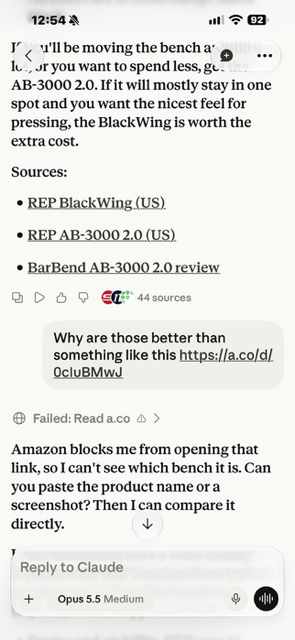
For an ecommerce site, this is the result of blocking these crawlers. Claude couldn’t access the page so couldn’t provide comparison or purchase information.
How to Block
You can block crawlers for training, web search, and user-triggered requests, and opt out of AI answers, in a number of ways.
- robots.txt – many LLMs and traditional search engines respect robots.txt directives aimed at training or web search user agents. (Note that most user-triggered fetchers ignore robots.txt directives as they treat them as requests from the user who triggered them. Anthropic’s Claude-User and DuckDuckGo’s DuckAssistBot are the exceptions.) On October 30, 2026, Google, Microsoft, Anthropic, and OpenAI announced support of a shared user-agent to control whether site content can be used in AI training. See more on this below.
- robots meta noarchive/nosnippet tag – Bing/Copilot has no training user agent to block. Until March 1, 2027, a noarchive meta tag opts a page out of Microsoft’s AI training and Copilot answers. Microsoft is replacing that and beginning February 1, 2027 it will read the shared
__usage_ai-trainingrobots.txt group for training, a page-levelai-training:disallowmeta tag or header, and a separateai-groundingmeta tag or header for answers (see Opting Out of AI Answers). For Google and Apple, the nosnippet meta tag keeps a page out of AI-generated answers (see Opting Out of AI Answers). - WAF or CDN rules applied to published IP lists. (The IP lists are linked in Verifying User Agents below.)
- htaccess – you can configure an .htaccess file to return a 403 forbidden response based on user agent. This method only works for user agents presented during crawling. (For instance, Google crawls sites using Googlebot but then doesn’t use the output for AI training if you’ve blocked Google-Extended with robots.txt. But since Google doesn’t actually crawl with Google-Extended, configuring the server to return a 403 for this user agent won’t have any impact.)
Using robots.txt
LLMs like Claude and ChatGPT use specific user-agents for crawling sites for training so you can block those user-agents directly using the robots.txt exclusion protocol.
Google and Apple don’t crawl sites for training data separately from their regular web crawls so instead you can indicate whether that regular web crawling can be used for training by blocking the Google-Extended and Applebot-Extended user agents respectively. This means that even though there’s only one crawl (and the user agent used during that crawl doesn’t include “Extended” in the name), you can block usage for only training data and not web search indexing. (Google-Extended also controls whether Gemini can use your content for grounding, so blocking it can cost you Gemini visibility.) Starting in early 2027, Google will also read the shared __usage_ai-training robots.txt group as if you had disallowed Google-Extended, grounding included, unless your file has its own Google-Extended group, which takes precedence.
If you want to block LLMs from using your content for training data, you may want to block Common Crawl as well (CCBot). Common Crawl is a non-profit that maintains a corpus of web crawl data for anyone to use (founded in 2007, with archives back to 2008). LLMs use Common Crawl data extensively for training. Common Crawl’s public index records every request its crawler made and the status it got, so you can see whether CCBot reached your pages and whether your site served or refused it.
You don’t block access using a new LLM-specific directive; it’s the same one used to block traditional web search user agent (Disallow). You can set a disallow directive for specific site sections or the entire site. See the LLM Bot Usage Summary below for a list of crawlers.
An example:
User-agent: ClaudeBot
Disallow: /folder-of-great-stuff/
Note that a crawler follows only the most specific group that names it, so once you add a group for ClaudeBot, ClaudeBot ignores everything in your User-agent: * group. Repeat any site-wide rules you still want it to follow.
A common setup is to block AI training but leave search and user-triggered crawlers open:
User-agent: GPTBot
User-agent: ClaudeBot
User-agent: CCBot
User-agent: Google-Extended
User-agent: Applebot-Extended
User-agent: meta-externalagent
User-agent: Amazonbot
User-agent: Bytespider
User-agent: MistralAI-Training
Disallow: /
Microsoft doesn’t have a training token today, so add a noarchive meta tag for Bing until March 1, 2027. From February 1, 2027, Microsoft reads the shared group below instead.
# Shared AI-training signal (IETF draft; Google early 2027, Microsoft Feb 1 2027, OpenAI, Anthropic in progress)
# A "User-agent: *" group never counts as this signal, and this group never blocks crawling.
User-agent: __usage_ai-training
Disallow: /
Keep the per-company groups above: the shared group adds a preference, it doesn’t replace them, and a company’s own token (Google-Extended, Applebot-Extended) wins over the shared one wherever both appear.
Note that Meta has updated their commercial terms to give them the right to crawl web pages tied to your products and services if you use their business products (ads, Facebook or Instagram page, shop) as of November 20, 2026. It’s unclear if this means they’ll ignore robots.txt directives (their crawler documentation hasn’t changed).
Requiring a Login
If you require users to log in (with either a free or paid account) and you serve that same login to bots, then the bots won’t be able to access the content.
Blocking at a Web Application Firewall (WAF) or CDN
Use a CDN like Cloudflare, Fastly, or Akamai to detect the user agent and return a 403 (forbidden) or 402 (that points at licensing). This can also be URL pattern or page specific. For example:
(http.user_agent contains "ClaudeBot") and (http.request.uri.path contains "/folder-of-great-stuff/")A block at the CDN happens before the request reaches your site, so robots.txt can say a crawler is allowed while the CDN refuses it, and your server logs won’t show the refusal. Your host can do the same thing without you setting anything: some hosts block AI crawlers by default. AI Crawler Settings by Host and CDN: Cloudflare, Fastly, Akamai, WP Engine, Shopify, and More lists the default and the setting at each major CDN, host, bot-blocking service, and site platform.
Blocking Web Search Indexing
A full rundown of blocking or allowing access of traditional search engines for web search indexing is beyond this scope but a few notes:
- Blocking via robots.txt prevents crawling but technically doesn’t prevent indexing. Google may learn about the URL from external links for instance, so may index the URL itself (without its content) and meta data based on those external links and other third party input. In practice, this tends not to be a problem as there’s little the URL would rank for when Google doesn’t know anything about the page content (historically Google set this up because, for example, back in the day large brands would accidentally block their home page and so if Google knew that home page URL existed, they would still want to rank it for brand searches). I generally recommend just using robots.txt in most cases since you get the crawl efficiency benefit. But technically, to keep a page from being indexed at all and to remove even the possibility it would show up in search results, use the noindex meta data instead.
- Excluding a URL from an XML Sitemap doesn’t prevent it from being crawled and indexed. (Just like including a URL doesn’t guarantee it will be crawled and indexed.) XML Sitemaps are one among many discovery mechanisms.
- Using the Google Search Console URL removal tool isn’t a permanent solution. It’s intended to quickly remove a URL (faster than a recrawl/deindex process would take). You’ll have to also put in a permanent fix such as a noindex, robots.txt disallow, 404/410, or login. Otherwise, the URL will show up in search results again in about six months. Also, the URL removal tool functionality is entirely related to the search results display. It doesn’t impact the actual web search index so if you’re trying to remove a bunch of low-quality or spammy pages from your site so that Google views the overall site as higher quality, using the URL removal tool on those pages won’t help. (Also don’t use this tool to remove non-canonical URLs from Google’s index, as that can cause the canonical URL to be removed as well, based on how Google clusters non-canonical and canonical URLs together in its index.)
Blocking User-Triggered Requests
Most user-triggered fetchers ignore robots.txt, because the vendors treat the request as coming from the user rather than from a crawler. The exceptions are Anthropic’s Claude-User and DuckDuckGo’s DuckAssistBot. To block the others, return a 403 based on the user agent at the server or CDN (see the WAF example above). Block these by user agent rather than IP address: some of them run on the user’s own computer (Claude Code, for instance), so their requests come from ordinary home and office networks.
Opting Out of AI Answers
You can specifically opt-out of AI results (AI overviews, AI mode, AI features in Discover) in Google Search Console (Settings > Search generative AI).
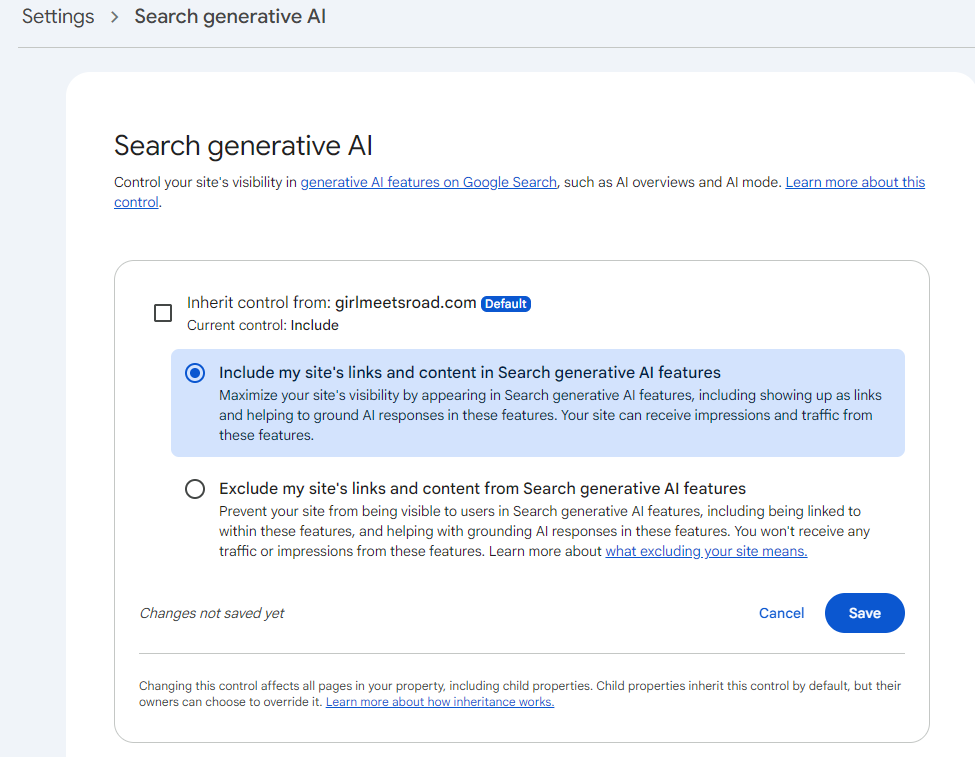
Note that opting out might also keep your site from modules like top stories, as that is increasingly being powered by AI overviews. So while opting out of AI results won’t impact traditional web search visibility, more and more search results components are shifting to being sourced from AI results rather than web search results so the impact may be greater than you expect. (Note that this Google Search Console control doesn’t impact use of a site’s content in AI training models.)
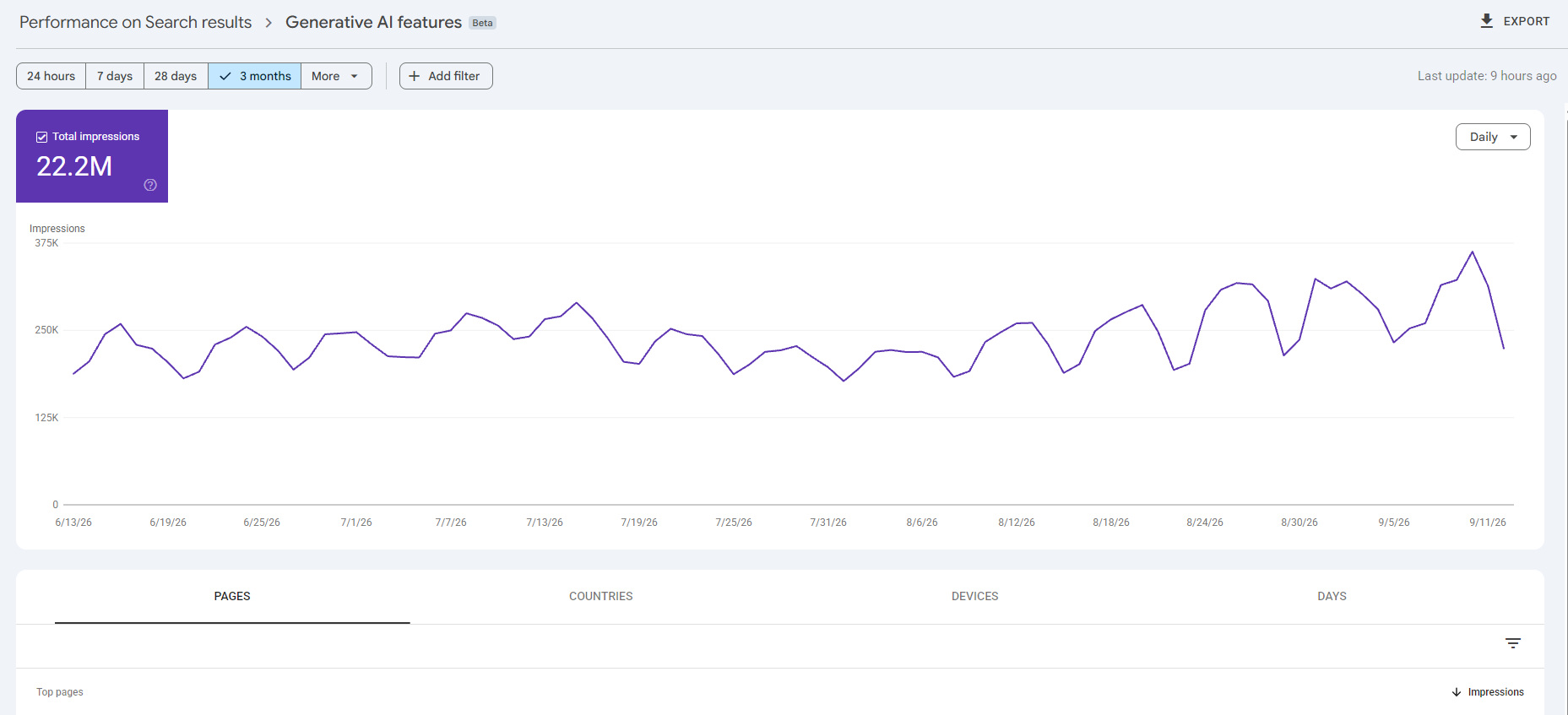
Google Search Console does provide impression-level data by URL on AI overviews so you can see what visibility you may be losing by opting out (Performance > Search Results > Generative AI).
You can also opt out of Google’s AI overviews and AI mode by adding the nosnippet meta tag to your pages. Note that this also removes the snippet from the organic search listings (the page still ranks but displays only the URL and title). This doesn’t impact Gemini visibility. If you only want part of a page kept out (such as a particular page component), wrap that section of the page in an element with the data-nosnippet attribute. That will omit that section and the rest of the page will remain eligible for snippets and AI Overviews.
You can also opt out of Apple’s AI answers in Siri and search with the nosnippet meta tag. For Copilot, the noarchive meta tag keeps a page out of Copilot answers and out of Microsoft’s AI training, but only until March 1, 2027. On October 30, 2026, Microsoft announced that it’s replacing noarchive and nocache with two separate preferences: one for training and one for grounding (using your page to build an answer in Bing, Copilot, or Microsoft 365). Starting February 1, 2027, Bingbot reads these as it recrawls:
<meta name="Bingbot" content="ai-grounding:disallow">
<meta name="Bingbot" content="ai-training:disallow">
Both can also be sent as a header (X-Robots-Tag: Bingbot: ai-grounding:disallow). The grounding preference has a third value, ai-grounding:disallowextended, which lets Microsoft’s own products use the page but not the grounding Microsoft provides to other companies through Web IQ and its Foundry API. Grounding is page-level only; there’s no robots.txt version. Training can also be set site-wide with the shared robots.txt group (see Using robots.txt above), and a page-level ai-training value overrides it for that page. Neither preference affects whether the page appears in regular Bing search results.
If you use noarchive or nocache today, Microsoft stops reading them for training and answers on March 1, 2027. To keep pages out of Copilot answers through the transition, add the new tag to each page and also record a temporary grounding preference in Bing Webmaster Tools, which opens for this on December 15, 2026. The temporary setting holds until Bingbot recrawls the page or September 30, 2027, whichever comes first; without it, pages default to allowed for grounding until they’re recrawled. Microsoft’s FAQ has the full schedule.
Note that this is the opposite of Google’s design, where one robots.txt token (Google-Extended) covers both training and Gemini grounding, and the Search Console setting covers AI Overviews and AI Mode. At Microsoft, training and grounding are separate choices, and the grounding choice lives only on the page.
You may also see noai and noimageai recommended as values for the robots meta tag or the X-Robots-Tag header (a convention DeviantArt introduced in 2022). They ask AI systems not to use the page or its images, but no crawler documents honoring them, so they state intent only.
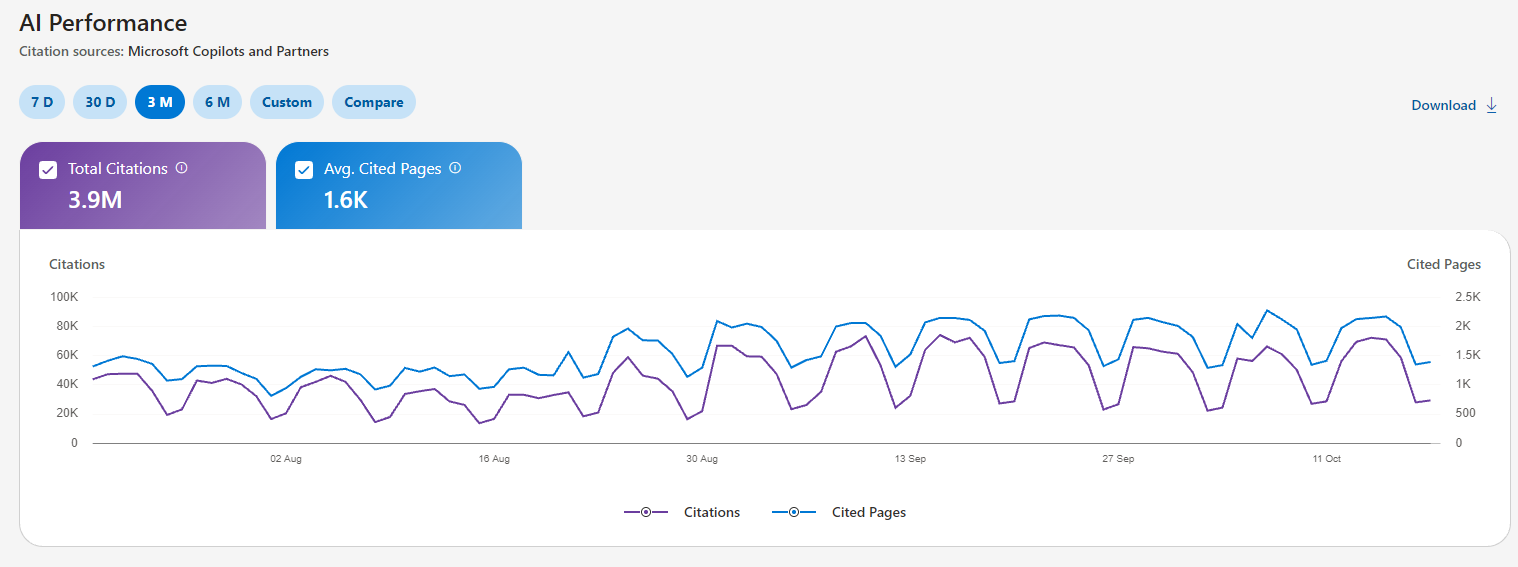
And note that you can also see Copilot visibility in Bing webmaster tools (and a report of grounding queries as well).
LLM Bot Usage Summary
Many of the crawler lists I encountered when researching this article were out of date, so this is the list I’ve compiled that as far as I can tell is accurate as of October 2026. No promises for the future though. I’m maintaining a tools page that includes a crawler check to determine what your site is currently allowing and blocking, as well as a Google Sheet with the details below (and more). I do have a Claude process set up to review and update the Google Sheet every week so it stays up to date.
| LLM/Search Engine | Training | Web Search | User-Triggered Access | Notes |
|---|---|---|---|---|
| OpenAI/ChatGPT | GPTBot | OAI-SearchBot | ChatGPT-User | OpenAI says it will honor the shared __usage_ai-training group in the coming months; GPTBot rules will continue to apply. |
| Anthropic/Claude | ClaudeBot | Claude-SearchBot | Claude-User | There’s no need to specify anthropic-ai in your robots.txt file as Anthropic no longer documents it (if you set up blocking with this user agent, you’ll need to update your robots.txt file to the latest user agent strings). Also note that the IP list json file does not cover requests from the MCP connector or Claude Code. See the documentation on the MCP connector and API tool requests. Anthropic says it has started implementing the shared __usage_ai-training training signal. |
| Common Crawl | CCBot | Open web corpus used by LLMs for training models | ||
| Google-Extended | Googlebot | Google-Agent FeedFetcher-Google GoogleMessages Google-Pinpoint GoogleProducer Google-CWS Google-Read-Aloud Google-Site-Verification Google-GeminiNotebook | Block Googlebot to block all Google web search indexing user agents; use more specific user agents to block for specific purposes (such as Googlebot-Image) You can’t block user-triggered requests with robots.txt as those user agents ignore robots.txt. To block them, return a 403 based on user agent at the server or CDN. Google-Extended will also be set by the shared __usage_ai-training group from early 2027 unless Google-Extended has its own group. | |
| Google Vertex/Agent Search | Google-CloudVertexBot | Agent Search enables you to create AI-powered search from site content. If you don’t want your site’s content used in an Agent Search app, you can block access. (Note that blocking Googlebot also blocks this crawler.) (Cloudflare classifies this user agent as training so if you block AI training crawlers in Cloudflare, this will be blocked as well.) | ||
| Apple | Applebot-Extended | Applebot | You can also use the meta robots nosnippet tag to keep content from AI-generated answers. | |
| Yahoo | Slurp | Yahoo primarily uses Bing’s web search index but does supplementary crawling with Slurp for its mobile search results and partner sites. | ||
| Meta/Facebook/Instagram | Meta-ExternalAgent | Meta-WebIndexer | Meta-ExternalFetcher FacebookExternalHit | FacebookExternalHit is used for link previews in social sharing. Meta-ExternalAgent is used for training and may also be used to index content directly. If you use Meta’s business products, Meta’s Commercial Terms also grant it a crawl right by contract (see Using robots.txt). |
| Amazon | Amazonbot | Amzn-SearchBot | Amzn-User | Amazonbot is used “to improve our products and services” and “may be used to train Amazon AI models.” Amazon says Amzn-SearchBot and Amzn-User don’t crawl content for AI training. Amazonbot also treats the noarchive meta tag as a training opt-out. |
| Amazon Bedrock | bedrockbot amazon-bedrock-knowledgebase-on-behalf-of-<hash> | This is the crawler used when an AWS customer connects a web crawler data source to a Bedrock knowledge base. | ||
| ByteDance/TikTok | Bytespider | TikTokSpider | ByteDance doesn’t publish documentation for either user agent. | |
| Microsoft | bingbot | Indexes for Bing, Yahoo, DuckDuckGo and Copilot, and may supply part of ChatGPT search (although that is not documented). To opt out of Copilot training and answers, use meta robots noarchive. (This doesn’t impact the bing traditional search index.) If you opt out of web search with noindex, you are opted out of training as well. Beginning February 1, 2027 Microsoft will read the shared __usage_ai-training robots.txt group for training and page-level ai-training and ai-grounding values in a Bingbot meta tag or X-Robots-Tag header. noarchive and nocache will no longer be used for training and answers beginning March 1, 2027. | ||
| Perplexity | PerplexityBot | Perplexity-User | See the IP list json | |
| Brave | Brave follows settings for Googlebot, so however you block or allow Google will also apply to Brave. (This means that if you block Googlebot, you may also remove the site from Claude’s web search.) | |||
| DuckDuckGo | DuckDuckBot | DuckAssistBot | DuckAssist provides AI-generated answers. DuckDuckGo primarily uses Bing for its web search index, but does supplementary crawling with DuckDuckBot. | |
| DeepSeek | DeepSeekBot is often referenced as being used for both training models and web search but there’s no official documentation or evidence of this. | |||
| Yandex | YandexBot | Note that User-agent: Yandex matches every Yandex robot, including its ad robots, so use YandexBot to target search crawling.Block YandexAdditional and YandexAdditionalBot if you don’t want a site to appear in AI answers. | ||
| Mistral | MistralAI-Training | MistralAI-Index | MistralAI-User | |
| xAI | Bot directories list several names for xAI’s crawler (xAI-SearchBot, GrokBot, xAI-Grok), and xAI doesn’t document any of them. There’s no official documentation on robots.txt support, user agents, or IP ranges. |
Verifying User Agents
Back in the day, scrapers would spoof the Googlebot user agent in order to crawl sites and we at Google had to add a way to verify it. Since everything old is new again, the LLMs are now making IP ranges or reverse DNS patterns available.
When giving bots special treatment, you want to make sure they are who they say they are. A crawler like GPTBot or PerplexityBot coming from an IP address that isn’t on the vendor’s list is very likely fake. The clearest signs of a fake: one IP address cycling through several companies’ bot names or requests for paths like /.env. But don’t treat a missing IP match as proof of a fake for agents that run on the user’s own computer (Claude Code, for instance).
- OpenAI/ChatGPT
- Anthropic/Claude
- Anthropic crawler IP addresses (covers Anthropic’s crawlers and the Claude-User fetcher, but not the MCP connector or API tool requests, and Claude Code runs on the user’s own computer)
- The Anthropic API web fetch tool uses the same Claude-User user agent as claude.ai but from IP addresses that aren’t on the list (as of October 2026). So a site that only allows listed addresses would treat API fetches as unverified.
- Perplexity
- Amazon
- Apple
- Microsoft
- Common Crawl
- Mistral
Meta, ByteDance, and xAI don’t publish IP lists, and Yandex offers reverse DNS lookups only.
A Note About Cloudflare
Cloudflare, which is used by more than 20% of websites, can block or allow crawlers by purpose (training, web search, and user-triggered “agent” requests) at its edge, before the request reaches your site. Since September 15, 2026, new ad-supported sites are offered a preset that disallows AI training and blocks agent requests on pages with ads.
The Block option for training also stops Googlebot, Bingbot, and Applebot from crawling your pages, search included; choose Disallow AI Training instead to stay in search. If your site is on Cloudflare, check Security > Settings > Configure AI bot policies, and check whether Bot Preference Sync has added lines to your robots.txt. Each Cloudflare setting, and the bot settings at other CDNs, hosts, and bot-blocking services, is in AI Crawler Settings by Host and CDN: Cloudflare, Fastly, Akamai, WP Engine, Shopify, and More.
Troubleshooting: Why Isn’t My Site Showing Up in LLM Search?
If your site isn’t showing up in AI answers the way you expect, a block may be somewhere you didn’t set it. Check these places:
- The live robots.txt file on your domain, not the copy in your CMS or code repository. A CDN can add lines to it (Cloudflare’s Bot Preference Sync does).
- Your CDN or WAF bot settings (in Cloudflare, Security > Settings > Configure AI bot policies). For other CDNs and hosts, see AI Crawler Settings by Host and CDN: Cloudflare, Fastly, Akamai, WP Engine, Shopify, and More.
- Your host. When I checked this site in October, my host was returning a 403 to GPTBot, OAI-SearchBot, ClaudeBot, PerplexityBot, and Bytespider, including robots.txt, even though my robots.txt allowed everything. My host, Tiger Tech, documents its list of blocked user agents and how to opt out (see Tiger Tech AI Crawler Settings), so yours may as well.
- Meta robots tags and X-Robots-Tag headers: noindex, nosnippet, and noarchive.
- The Search Console generative AI setting (Settings > Search generative AI), including whether the property inherits it from a parent property.
- A real request using each crawler’s user agent. (A robots.txt checker can’t see a block at the server or CDN.) A 429 isn’t always a block: some hosts limit how often a name can ask, and a test that sends many names at once can set off a limit on its own address, while some bot-protection services send their block page as a 429. Ask again a few seconds later, and read the page, before counting it as a refusal.
- Your server logs, to see which crawlers actually reach you and what response they get.
To check the Robots Exclusion protocol (robots.txt, meta robots tag, and X-Robots-Tag header) and the server response together, use my AI crawler access check tool, which requests the page with each crawler’s user agent. Note that since this tool doesn’t actually make requests using the crawlers’ IP addresses, sites that verify crawlers by IP address may treat the tool requests as fakes (the tool flags when this looks likely and explains how to confirm what real crawlers get). It makes one real request from Anthropic’s network to verify how Claude-User is handled. It also reads Common Crawl’s index for the site, which shows what the real CCBot got from Common Crawl’s own network: the status of its first 20 recorded requests to the site and of the page you checked.
You can also use a web tool like crawler check to test robots.txt rules, a desktop tool like Screaming Frog to test server response codes, or ask your favorite LLM (like Claude Code) to run an analysis.
Industry Standards for AI Crawlers
New standards are still evolving and they take time. In part because LLMs and therefore what standards are needed are still evolving, and in part because it’s hard to get organizations to agree (not everyone thinks the same standards are needed; every company may have a different approach and perspective). (As someone involved with the Google, Microsoft, and Yahoo XML Sitemaps alliance, I can attest that it’s not easy!)
New Shared Standard: __usage_ai-training in robots.txt
As of October 30, 2026, Google, Microsoft, Anthropic, and OpenAI have said they’ll support the new User-Agent: __usage_ai-training. As with other robots.txt directives, this can be set for the entire site or for specific directories. The shared AI training signal (__usage_ai-training) is an IETF draft written by Kevin Kelley at Anthropic and published October 30, 2026. Specify a new user-agent line with the token __usage_ai-training, and use Disallow and Allow lines to state your training preference path by path:
User-agent: __usage_ai-training
Disallow: /
Allow: /press-kit/
That robots.txt block says no content can be used for AI training except the press kit.
- A
User-agent: *doesn’t cover __usage_ai-training. So if you want to set directives at user-agent: __usage_ai-training, you need to specify it explicitly (even if you have user-agent: * set). - This directive doesn’t block crawling directly. Each company’s crawler tokens keep their current meaning, and a company’s token (Google-Extended, Applebot-Extended) is used instead of this shared one wherever both appear.
- The signal covers training of generative models only, under the IETF working group’s definition. It says nothing about web search, AI answers, or user-triggered requests.
- As with other robots.txt processing, a more specific instruction overrides a general one. So you can, for instance, set user-agent: __usage_ai-training to Disallow: / and set user-agent: Google-Extended to Allow: /, and that would allow Google to use the content for AI training but would disallow others (who support the token) from using it.
Google will support it in early 2027 as if you had disallowed Google-Extended, which means Gemini grounding is blocked as well. Microsoft will support it beginning February 1, 2027, along with new page-level training and grounding tags (see Opting Out of AI Answers above). OpenAI says it will honor it in the coming months and that GPTBot rules continue to apply. Anthropic has started implementing it, with no date specified.
Note that as of October 30, 2026, this group is not supported yet but adding it now won’t hurt anything (although if you want content blocked from AI training now, you should use other methods in the meantime).
Proposed Standards: Content-Signal, Content-Usage, DisallowAITraining, RSL, and TDMRep
Here are other proposed standards that have not yet been adopted for stating how AI may use a site.
- content-signal: Cloudflare has proposed this extension (and is putting it in robots.txt files) with three options that can have a yes or no flag: ai-train (use in LLM training models), ai-input (user-triggered LLM access), and search (use in web search indexing). The directive that would exclude LLMs from using the site in training data is content-signal: ai-train=no.
As far as I can tell, no LLMs have said they support it. Google’s John Mueller has said that “none of the crawlers/LLMs” use it and “it has no effects whatsoever for any crawler or LLM”.
It is frustrating that Cloudflare’s blog post announces they are adding this functionality as though it’s something that will actually benefit site owners today and is not straightforward about the fact that at least right now, it won’t actually do anything. On the one hand, the post says “Our customers are fully in the driver’s seat for what crawlers they want to allow and what they’d like to block.” But on the other hand, it also says “Signaling the rules of the road only works if others recognize those rules.” Which in addition to not being clear that currently this directive does nothing, makes it seem like any company not following the directive is not “following the rules of the road”, when the reality is that the rules of the road haven’t yet been established and Cloudflare is making up the rules on their own.
But anyway, their proposal is that these lines in a robots.txt file would allow all bots to crawl the entire site for web search indexing but not LLM training:
User-Agent: *
Content-Signal: search=yes ai-train=no
Allow: /- DisallowAITraining: Microsoft had proposed this similar extension to allow for web indexing but not AI training. IETF shows the proposal as expired (and the name changed). Microsoft has since said it will read the shared
__usage_ai-trainingsignal instead, from February 1, 2027. - content-usage: an IETF AI Preferences working group draft by Gary Illyes (Google) and Martin Thomson (Mozilla) that would add a Content-Usage line to robots.txt, and a matching HTTP header, stating allowed uses such as
train-ai=n. It’s a different mechanism from the shared__usage_ai-traininggroup above, which uses only existing robots.txt syntax; Kelley describes his draft as input to this one. The same working group maintains the vocabulary draft that defines what “AI training” means for both. No AI company has said it honors Content-Usage. - RSL (Really Simple Licensing): spearheaded by the non-profit RSL Collective, which is comprised of publishers such as Reddit, Yahoo, Medium, Quora, Ziff Davis, BuzzFeed, Vox Media, USA Today, and others. It proposes a License line to robots.txt that references a machine-readable terms file that says what is permitted and what the costs are. (Usage types are ai-train, ai-input, ai-index, search, ai-all, and all and costs are free, attribution, one time or subscription payment, pay per crawl, or pay per use). Fastly, Cloudflare, and Akamai are supporters but no AI company has said they honor it.
- TDMRep (Text and Data Mining Reservation Protocol): a W3C community group report (final version May 2024, led by EDRLab) written for the EU copyright directive’s text-and-data-mining opt-out. Unlike the others, it doesn’t use robots.txt. Instead, a site reserves its rights with a tdm-reservation HTTP header or meta tag, or a /.well-known/tdmrep.json file, and can point to a policy that states terms. No AI company has said it honors it.
Additional Questions
What is RAG (retrieval-augmented generation)?
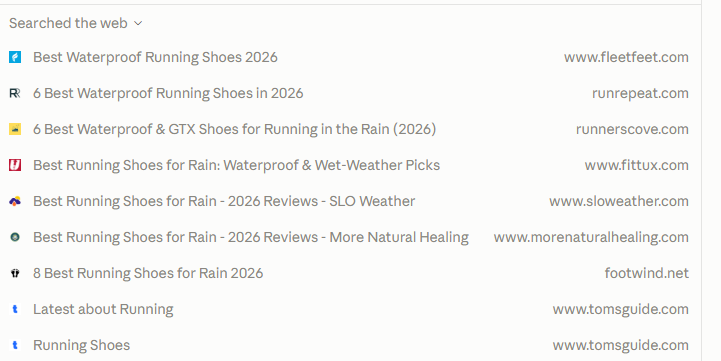
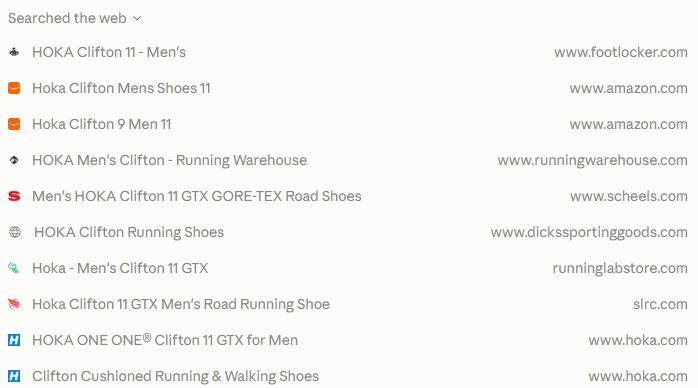
Retrieval-augmented generation is the process LLMs use to augment their training data with information from real-time (or at least at web search indexing-time) web pages. They combine input from both training data and web search results in their responses. They use training data to inform what web searches to do. For instance, if the user is asking about running shoes, the agent may generate a list of trusted brands from the training data and based on that, do web searches about those brands.
People refer to these web searches as “grounding queries” and “fan-out queries,” since they’re searches the LLM chooses to run based on the user’s prompt rather than the user’s own search. “Grounding” is Google’s term for retrieval-augmented generation, and “query fan-out” is Google’s term for the related searches the model generates to get more results for a response. Gemini runs its fan-out queries against the Google web index. There’s no site crawling when this happens; the search engine or LLM searches an index it has already built. You can watch an LLM such as ChatGPT or Claude do these searches during a session.
Do LLM crawlers read .md versions of pages or llms.txt files?
Not the way many people expect. In Dries Buytaert’s logs, no AI crawler asked for markdown in place of HTML, but some fetched .md files that the HTML pages linked to, along with the HTML itself. The requests for markdown come from coding agents such as Claude Code. There’s no measured benefit yet: in a controlled test by Profound, markdown pages got about one extra bot visit, which wasn’t statistically significant, and an Ahrefs study found that 97% of llms.txt files never get read. Google says Search doesn’t use llms.txt files or markdown versions.
What changed
- Oct 20, 2026
- First published.
- Oct 22, 2026
- Added how Cloudflare’s bot check affects crawlers, a note on Anthropic API fetches, and how the AI crawler access check tests crawlers.
- Oct 24, 2026
- Moved the detailed Cloudflare settings to AI Crawler Settings by Host and CDN: Cloudflare, Fastly, Akamai, WP Engine, Shopify, and More, which covers the bot settings at every major CDN, host, and bot-blocking service.
- Oct 28, 2026
- Added Common Crawl’s index as a way to see what the real CCBot got, and a note on reading a 429.
- Oct 29, 2026
- Added TDMRep to the proposed standards and the noai and noimageai meta tag values to opting out of AI answers; the AI crawler access check now reports which of these signals a site declares.
- Oct 30, 2026
- Added the shared __usage_ai-training robots.txt AI training signal (Google, Microsoft, Anthropic, OpenAI) and Microsoft’s new page-level training and grounding preferences, replacing noarchive and nocache beginning in 2027.